|
|
| Line 98: |
Line 98: |
| | <tr valign="top"> | | <tr valign="top"> |
| | <td> | | <td> |
| − | # If you have already closed the opening message window then the first step is to pause the session by pressing the <span style="font-weight: 700; font-size: 15px; color: white; background-color: black;"> P </span> key. | + | # Open the session '''SAR Northern Division Free Roam Session V2''' into '''Trainz Driver'''. To do this:<br> |
| | + | #* From the '''Driver/Surveyor''' loading screen select the route '''SAR Northern Division (Narrow Gauge) Route v2''' |
| | + | #* Then select <span style="font-weight: 700; color: white; background-color: grey;"> VIEW SESSIONS </span> |
| | + | #* Then select the session '''SAR Northern Division Free Roam Session V2''' |
| | + | #* Click <span style="font-weight: 700; color: white; background-color: grey;"> DRIVE SESSION </span> |
| | + | # If you have already closed the opening message window then pause the session by pressing the <span style="font-weight: 700; font-size: 15px; color: white; background-color: black;"> P </span> key. |
| | # If you decide to set the session clock to a different starting time (for example: to match the train timetable shown below) then follow the instructions shown in the '''Orders''' section | | # If you decide to set the session clock to a different starting time (for example: to match the train timetable shown below) then follow the instructions shown in the '''Orders''' section |
| | # Next locate your loco. '''Either''':- | | # Next locate your loco. '''Either''':- |
| Line 114: |
Line 119: |
| | # When you are ready to start, reload the '''Peterborough Base Session''' page (click the '''Scenarios''' button on your current location page) and select this '''Scenario''' again or just use the '''Back''' button on your browser - whichever is quicker. | | # When you are ready to start, reload the '''Peterborough Base Session''' page (click the '''Scenarios''' button on your current location page) and select this '''Scenario''' again or just use the '''Back''' button on your browser - whichever is quicker. |
| | # Switch back to '''Trainz''' | | # Switch back to '''Trainz''' |
| − | # Close the opening message window and, if '''Pause''' is shown on the screen, press the <span style="font-weight: 700; font-size: 15px; color: white; background-color: black;"> P </span> key to start the session. | + | # Close the opening message window if it is on the screen '''OR''' if '''Pause''' is shown on the screen instead, press the <span style="font-weight: 700; font-size: 15px; color: white; background-color: black;"> P </span> key. Both actions will start the session. |
| | </td> | | </td> |
| | </tr> | | </tr> |
Latest revision as of 17:12, 8 January 2026
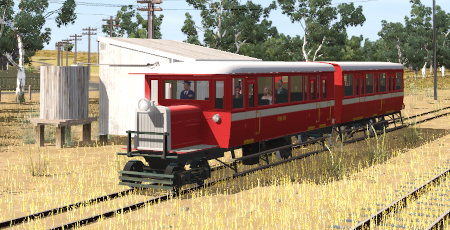
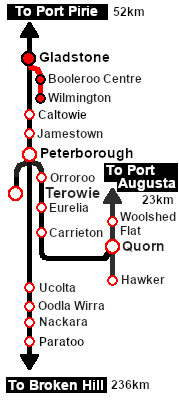
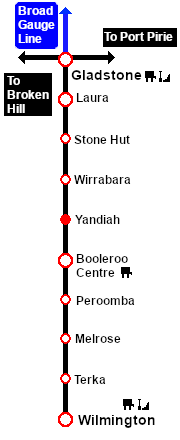
| Rail motor passenger services from Gladstone to Wilmington. |
 |
|
When, Where and With What
Similar/Related Scenarios
|

|
Each location in the layout has a detailed set of track diagrams that provide a variety of useful information
The Getting Started guide below gives a summary of what is available.
To display this information click any  graphic, or go to the bottom of the page for all the session links (all links will open in this window). graphic, or go to the bottom of the page for all the session links (all links will open in this window). |
Getting Started:
- Open the session SAR Northern Division Free Roam Session V2 into Trainz Driver. To do this:
- From the Driver/Surveyor loading screen select the route SAR Northern Division (Narrow Gauge) Route v2
- Then select VIEW SESSIONS
- Then select the session SAR Northern Division Free Roam Session V2
- Click DRIVE SESSION
- If you have already closed the opening message window then pause the session by pressing the P key.
- If you decide to set the session clock to a different starting time (for example: to match the train timetable shown below) then follow the instructions shown in the Orders section
- Next locate your loco. Either:-
- Open the Finder Tool (press Ctrl F ) and type, in the Name field, the name of the loco, in this case SAR RM55 or SAR RM56, then click the tick icon, OR
- Open the Driver List (bottom left of the screen) and then scroll through the list to find either:-
- the loco name (SAR RM55/SAR RM56) OR
- the driver icon (named Driver 55 or Driver 56) - this is a non-animated icon
- then click the drivers Eye icon
 to take control of the loco. to take control of the loco.
- Take a few moments to get your bearings. Click
 (this link will open in this window) to show the location details and track plans for Gladstone. Likewise for (this link will open in this window) to show the location details and track plans for Gladstone. Likewise for  . In each location details page:- . In each location details page:-
- the
 tab gives an overall summary of each location with a "potted" history (where available). tab gives an overall summary of each location with a "potted" history (where available).
- the
 tab reveals the invisible tab reveals the invisible  Track Marks for Drive To commands. Track Marks for Drive To commands.
- the
 tab lists all active industries and their commodities. tab lists all active industries and their commodities.
- the
 tab describes the names, locations and settings of all junction switches as well as some switch sets you may want to use. tab describes the names, locations and settings of all junction switches as well as some switch sets you may want to use.
- Each location details page has direct links to the adjacent locations so you can explore along the route.
- When you are ready to start, reload the Peterborough Base Session page (click the Scenarios button on your current location page) and select this Scenario again or just use the Back button on your browser - whichever is quicker.
- Switch back to Trainz
- Close the opening message window if it is on the screen OR if Pause is shown on the screen instead, press the P key. Both actions will start the session.
|
|
Tutorial:
 |
A tutorial on using these scenarios is provided in the link on the left. The link will open in this window |
|
Orders:
- Reverse the train from:-
- Gladstone Depot Loco Shed into Gladstone Station for trains 202, 203 & 206, or
- Wilmington Loco Depot Shed into Wilmington Station for train 600
- Proceed as shown in the timetable. The timetable is based on manual control (manually driving and setting switches) while the times for AI control will be 3-4 minutes faster over the entire route
- For
- For train 202, after arriving at Booleroo Centre, turn on the WYE and reverse back to the Station
- For trains 203/206, after arriving at Wilmington, turn on the WYE and stable in the Loco Depot Shed
- After returning to Gladstone stable in the Depot Loco Shed , after turning on the turntable.
|
 |
| Gladstone-Wilmington Passenger Timetable |
| |
Days
Train № |
|
|
|
M to F
202 |
M to F
203 |
Su
206 |
|
|
Train 203/206 schedule is from the 1964 working timetable |
|
| Gladstone Depot |
CEFJØWX |
dep |
|
11:10 |
21:20 |
21:35 |
|
| Gladstone Station |
dep |
|
11:20 |
21:25† |
21:40† |
|
| Laura |
ΔX |
arr |
|
11:39 |
21:41 |
21:56 |
|
|
|
| dep |
|
11:42 |
21:50 |
22:05 |
|
| Stone Hut |
X |
dep |
|
11:57 |
22:05 |
22:20 |
|
| Wirrabara |
X |
dep |
|
12:122 |
22:24 |
22:39 |
|
| Yandiah |
X |
dep |
|
12:29a |
22:42a |
22:57a |
|
| Booleroo Centre |
ΔWX |
arr |
|
12:45T |
22:55 |
23:10 |
|
|
|
| dep |
|
|
23:01 |
23:16 |
|
| Peroomba |
X |
dep |
|
|
23:13 |
23:27 |
|
| Melrose |
X |
dep |
|
|
23:283 |
23:42 |
|
| Terka |
X |
dep |
|
|
23:45 |
23:58 |
|
| Wilmington |
ΔCEWX |
arr |
|
|
23:56 |
00:08 |
(206) arrives Monday am |
| Depot |
|
|
|
ST |
ST |
Turn and stable overnight |
|
Days
Train № |
M to Sa
600 |
M to F
601 |
|
|
Train 600 schedule is from the 1964 working timetable |
|
| Wilmington Depot |
dep |
04:35 |
|
|
|
|
| Wilmington Station |
dep |
04:40 |
|
|
|
|
| Terka |
dep |
04:51 |
|
|
|
|
| Melrose |
dep |
05:11 |
|
|
|
|
| Peroomba |
dep |
05:24 |
|
|
|
|
| Booleroo Centre |
arr |
05:37 |
|
|
|
|
|
|
| dep |
05:40 |
13:45 |
|
|
|
| Yandiah |
dep |
05:56a |
14:02a |
|
|
|
| Wirrabara |
dep |
06:13 |
14:19 |
|
|
|
| Stone Hut |
dep |
06:28 |
14:34 |
|
|
|
| Laura |
arr |
06:421 |
14:48 |
|
|
|
|
|
| dep |
06:45 |
14:53 |
|
|
|
| Gladstone |
arr |
07:04† |
15:12 |
|
|
|
| Depot |
|
S |
S |
|
|
Refuel and stable |
|
|
|
| bold time = arrive/depart time |
plain time = timing point |
| Service Symbols: |
| A Attach wagons |
D Detach wagons |
L Load |
S Stable loco |
T Turn loco |
| U Unload |
a on request stop |
c coal (if required) |
w water (if required) |
|
| † connects with broad gauge service to/from Adelaide |
| 1 Cross train 260 M Th |
2 Cross train 660 M Th |
3 Cross train 624 (W) |
|
| Location Symbols: |
| Δ = Turning Triangle |
C = Loco Coal Loader |
E = Engine Depot |
F = Fixed Signals |
| J = Junction |
Ø = Loco Turntable |
W = Loco Water Tank |
X = Crossing Loop |
|
|
|
This page was created by Trainz user pware in February 2021 and was last updated as shown below.