SAR Scenario Terowie-Paratoo Livestock V2
From TrainzOnline
(Difference between revisions)
m |
m |
||
| (7 intermediate revisions by one user not shown) | |||
| Line 16: | Line 16: | ||
<td align="left">Livestock movements between '''Peterborough''' and '''Terowie''' and from '''Paratoo''' to '''Peterborough'''.</td> | <td align="left">Livestock movements between '''Peterborough''' and '''Terowie''' and from '''Paratoo''' to '''Peterborough'''.</td> | ||
<td align="right">[[file:BackToBottom.png|link=#bottom|alt=Bottom|Bottom]]</td> | <td align="right">[[file:BackToBottom.png|link=#bottom|alt=Bottom|Bottom]]</td> | ||
| + | </tr> | ||
| + | <tr valign="top"> | ||
| + | <td colspan=2 bgcolor="black"></td> | ||
</tr> | </tr> | ||
</table> <!-- END Summary table --> | </table> <!-- END Summary table --> | ||
| − | --- | + | |
| + | <span style="font-weight: 700; font-size: 15px; color: white; background-color: black;"> When, Where and With What </span><br> | ||
| + | |||
<table width=1000> <!-- BEGIN Scenario image and loco/consist table --> | <table width=1000> <!-- BEGIN Scenario image and loco/consist table --> | ||
<tr valign="top"> | <tr valign="top"> | ||
| Line 38: | Line 43: | ||
<tr valign="top"> | <tr valign="top"> | ||
<td><span style="font-size: 15px; font-weight: 700; color: white; background-color: black;"> Loco: </span></td> | <td><span style="font-size: 15px; font-weight: 700; color: white; background-color: black;"> Loco: </span></td> | ||
| − | <td> | + | <td>The [[image:Loco_Roster_Label.png|link=SAR Peterborough Division Loco Roster_V2]] has locos available at the <span style="font-weight: 700; font-size: 15px; color: white; background-color: black;"> Terowie Loco Depot </span>'''</td> |
</tr> | </tr> | ||
<tr valign="top"> | <tr valign="top"> | ||
| Line 87: | Line 92: | ||
</table> <!-- END Scenario image and loco/consist table --> | </table> <!-- END Scenario image and loco/consist table --> | ||
| + | <span style="font-weight: 700; font-size: 15px; color: white; background-color: black;"> Similar/Related Scenarios </span><br> | ||
| + | |||
| + | <table width=1000> | ||
| + | <tr valign="top"> | ||
| + | <td width=20><span style="font-weight: 700; background-color: black; color: white;"> 7 </span> </td> | ||
| + | <td width=310>'''[[SAR Scenario Peterborough-Quorn Local Freight_V2|Peterborough-Quorn Local Freight]]'''</td> | ||
| + | <td width=20><span style="font-weight: 700; background-color: black; color: yellow;"> 22 </span> </td> | ||
| + | <td width=310>'''[[SAR Scenario Gladstone Local Livestock_V2|Gladstone Local Livestock]]'''</td> | ||
| + | <td width=330> </td> | ||
| + | </tr> | ||
| + | </table> | ||
| + | <br> | ||
<table bgcolor="lightcyan" width=1000> <!-- BEGIN Location Data table --> | <table bgcolor="lightcyan" width=1000> <!-- BEGIN Location Data table --> | ||
<tr> | <tr> | ||
| Line 103: | Line 120: | ||
<tr valign="top"> | <tr valign="top"> | ||
<td> | <td> | ||
| − | # If you have already closed the opening message window then | + | # Open the session '''SAR Northern Division Free Roam Session V2''' into '''Trainz Driver'''. To do this:<br> |
| + | #* From the '''Driver/Surveyor''' loading screen select the route '''SAR Northern Division (Narrow Gauge) Route v2''' | ||
| + | #* Then select <span style="font-weight: 700; color: white; background-color: grey;"> VIEW SESSIONS </span> | ||
| + | #* Then select the session '''SAR Northern Division Free Roam Session V2''' | ||
| + | #* Click <span style="font-weight: 700; color: white; background-color: grey;"> DRIVE SESSION </span> | ||
| + | # If you have already closed the opening message window then pause the session by pressing the <span style="font-weight: 700; font-size: 15px; color: white; background-color: black;"> P </span> key. | ||
# If you decide to set the session clock to a different starting time (for example: to match the train timetable shown below) then follow the instructions shown in the '''Orders''' section | # If you decide to set the session clock to a different starting time (for example: to match the train timetable shown below) then follow the instructions shown in the '''Orders''' section | ||
# Next locate your loco. '''Either''':- | # Next locate your loco. '''Either''':- | ||
| Line 119: | Line 141: | ||
# When you are ready to start, reload the '''Peterborough Base Session''' page (click the '''Scenarios''' button on your current location page) and select this '''Scenario''' again or just use the '''Back''' button on your browser - whichever is quicker. | # When you are ready to start, reload the '''Peterborough Base Session''' page (click the '''Scenarios''' button on your current location page) and select this '''Scenario''' again or just use the '''Back''' button on your browser - whichever is quicker. | ||
# Switch back to '''Trainz Driver Mode''' | # Switch back to '''Trainz Driver Mode''' | ||
| − | # Close the opening message window | + | # Close the opening message window if it is on the screen '''OR''' if '''Pause''' is shown on the screen instead, press the <span style="font-weight: 700; font-size: 15px; color: white; background-color: black;"> P </span> key. Both actions will start the session. |
</td> | </td> | ||
</tr> | </tr> | ||
| Line 336: | Line 358: | ||
<td align="right">'''arr'''</td> | <td align="right">'''arr'''</td> | ||
<td> </td> | <td> </td> | ||
| − | <td> '''11: | + | <td> '''11:20cwDT'''</td> |
<td> </td> | <td> </td> | ||
| − | <td>Detach 4 sheep or 3 cattle wagons at stockyard | + | <td>Detach 4 sheep or 3 cattle wagons at stockyard</td> |
</tr> | </tr> | ||
<tr> | <tr> | ||
| Line 540: | Line 562: | ||
</tr> | </tr> | ||
</table> <!-- END Black Border for Orders Table --> | </table> <!-- END Black Border for Orders Table --> | ||
| − | <table width=820> <!-- BEGIN Symbol Table --> | + | |
| + | <table width=820> <!-- BEGIN Train Symbol Table --> | ||
<tr valign="top"> | <tr valign="top"> | ||
<td colspan=2>'''bold time''' = arrive/depart time</td> | <td colspan=2>'''bold time''' = arrive/depart time</td> | ||
| Line 546: | Line 569: | ||
</tr> | </tr> | ||
<tr valign="top"> | <tr valign="top"> | ||
| − | <td colspan= | + | <td colspan=5><span style="font-weight: 700; font-size: 15px;">Service Symbols:</span></td> |
</tr> | </tr> | ||
<tr valign="top"> | <tr valign="top"> | ||
| − | <td width= | + | <td width=164>'''A''' Attach wagons</td> |
| − | <td width= | + | <td width=164>'''D''' Detach wagons</td> |
| − | <td width= | + | <td width=164>'''L''' Load</td> |
| − | <td width= | + | <td width=164>'''S''' Stable loco</td> |
| + | <td width=164>'''T''' Turn loco</td> | ||
</tr> | </tr> | ||
<tr valign="top"> | <tr valign="top"> | ||
| − | <td>''' | + | <td>'''U''' Unload</td> |
<td>'''a''' on request stop</td> | <td>'''a''' on request stop</td> | ||
<td>'''c''' coal (if required)</td> | <td>'''c''' coal (if required)</td> | ||
<td>'''w''' water (if required)</td> | <td>'''w''' water (if required)</td> | ||
| + | <td> </td> | ||
</tr> | </tr> | ||
| + | </table> <!-- END Train Symbol Table --> | ||
| + | <table width=820> <!-- BEGIN Train Crossing Table --> | ||
<tr valign="top"> | <tr valign="top"> | ||
| − | <td>'''<sup>1</sup>''' Cross '''train [[SAR Scenario Gladstone Bulk Ore_V2|821]]'''</td> | + | <td width=205>'''<sup>1</sup>''' Cross '''train [[SAR Scenario Gladstone Bulk Ore_V2|821]]'''</td> |
| − | <td>'''<sup>2</sup>''' Cross '''train [[SAR Scenario Gladstone-Terowie Passenger_V2|210]]'''</td> | + | <td width=205>'''<sup>2</sup>''' Cross '''train [[SAR Scenario Gladstone-Terowie Passenger_V2|210]]'''</td> |
| − | <td> </td> | + | <td width=205> </td> |
| − | <td> </td> | + | <td width=205> </td> |
</tr> | </tr> | ||
| + | </table> <!-- END Train Crossing Table --> | ||
| + | <table width=820> <!-- BEGIN Location Symbol Table --> | ||
<tr valign="top"> | <tr valign="top"> | ||
<td colspan=4><span style="font-weight: 700; font-size: 15px;">Location Symbols:</span></td> | <td colspan=4><span style="font-weight: 700; font-size: 15px;">Location Symbols:</span></td> | ||
</tr> | </tr> | ||
<tr valign="top"> | <tr valign="top"> | ||
| − | <td>'''Δ = Turning Triangle'''</td> | + | <td width=205>'''Δ = Turning Triangle'''</td> |
| − | <td>'''C = Loco Coal Loader'''</td> | + | <td width=205>'''C = Loco Coal Loader'''</td> |
| − | <td>'''E = Engine Depot'''</td> | + | <td width=205>'''E = Engine Depot'''</td> |
| − | <td>'''F = Fixed Signals'''</td> | + | <td width=205>'''F = Fixed Signals'''</td> |
</tr> | </tr> | ||
<tr valign="top"> | <tr valign="top"> | ||
| Line 584: | Line 613: | ||
<td colspan=4 bgcolor="black"></td> | <td colspan=4 bgcolor="black"></td> | ||
</tr> | </tr> | ||
| − | </table> | + | </table> <!-- END Location Symbol Table --> |
| − | + | ||
| − | + | ||
| − | + | ||
| − | + | ||
| − | + | ||
| − | + | ||
| − | + | ||
</td> | </td> | ||
</tr> | </tr> | ||
| Line 615: | Line 638: | ||
</tr> | </tr> | ||
</table> <!-- END Black border for Driving Notes table --> | </table> <!-- END Black border for Driving Notes table --> | ||
| − | + | ||
<table width=1000> <!-- BEGIN End Links Table --> | <table width=1000> <!-- BEGIN End Links Table --> | ||
<tr valign="top"> | <tr valign="top"> | ||
| Line 632: | Line 655: | ||
<td width=30 align="center">[[image:ArrowRightBtn.png|link=SAR Scenario Gladstone Local Livestock_V2|30px]]<br> | <td width=30 align="center">[[image:ArrowRightBtn.png|link=SAR Scenario Gladstone Local Livestock_V2|30px]]<br> | ||
<span style="font-weight: 700; font-size: 15px; color: yellow; background-color: black;"> 22 </span></td> | <span style="font-weight: 700; font-size: 15px; color: yellow; background-color: black;"> 22 </span></td> | ||
| + | </tr> | ||
| + | <tr valign="top"> | ||
| + | <td colspan=9 bgcolor="black"></td> | ||
</tr> | </tr> | ||
</table> <!-- END End Links Table --> | </table> <!-- END End Links Table --> | ||
<span id="bottom"></span> | <span id="bottom"></span> | ||
| − | |||
This page was created by Trainz user '''<span class="plainlinks">[http://online.ts2009.com/mediaWiki/index.php/User:Pware pware]</span>''' in June 2022 and was last updated as shown below. | This page was created by Trainz user '''<span class="plainlinks">[http://online.ts2009.com/mediaWiki/index.php/User:Pware pware]</span>''' in June 2022 and was last updated as shown below. | ||
---- | ---- | ||
Latest revision as of 17:18, 8 January 2026
 20 |
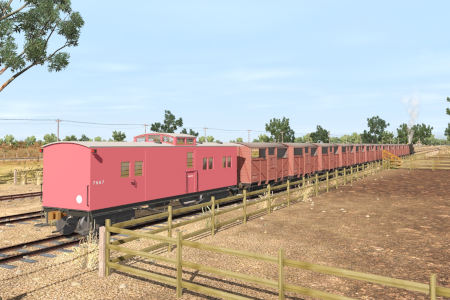
21 Terowie-Paratoo Livestock Runs A scenario in the SAR Peterborough Base Session v2.0 |
 22 |
| Livestock movements between Peterborough and Terowie and from Paratoo to Peterborough. |  |
When, Where and With What
 |
|
||||||||||||||||||||||||||

Similar/Related Scenarios
| 7 | Peterborough-Quorn Local Freight | 22 | Gladstone Local Livestock |
|
|
Each location in the layout has a detailed set of track diagrams that provide a variety of useful information The Getting Started guide below gives a summary of what is available.  graphic, or go to the bottom of the page for all the session links (all links will open in this window). graphic, or go to the bottom of the page for all the session links (all links will open in this window). |
Getting Started:
|
 to take control of the loco.

 tab gives an overall summary of each location with a "potted" history (where available).
 tab reveals the invisible
  Track Marks for Drive To commands.
 tab lists all active industries and their commodities.
 tab describes the names, locations and settings of all junction switches as well as some switch sets you may want to use.
Tutorial:
|
|
|||||||||||||||||||||||||||||||||||||||||||||||||||||||||||||||||||||||||||||||||||||||||||||||||||||||||||||||||||||||||||||||||||||||||||||||||||||||||||||||||||||||||||||||||||||||||||||||||||||||||||||||||||||||||||||||||||||||||||||||||||||||||||||||||||||||||||||||||||||||||||||||||||||||||||||||||||||||||||||||||||||||||||||||||||||||||||||||||||||||||||||||||||||||||||||||||||||||||||||||||||||||||||||||||||||||||||||||||||||

Driving Notes:
|


| Links: All links will open in this window | ||||||||
20 |
 Scenario Index |
 Location Index |
 Drive Tutorial |
 Rolling Stock List |
 Loco Roster |
 Active Industries |
 |
22 |
This page was created by Trainz user pware in June 2022 and was last updated as shown below.
